


MaybeWorks runs hiring, onboarding, time off, surveys, HR analytics and departures for 120+ engineers in one system, MayBee HRMS. The company started building the system for itself in 2021 and became its first customer in 2023. An owner's walkthrough of how that works day to day, what the company configured and where the system stops.
We run hiring, onboarding, time off, surveys, HR analytics and departures for 120+ engineers in one system, MayBee HRMS, and we built that system ourselves: it lives at maybee.systems, so read this as an owner's account. Many of those engineers work in clients' teams through staff augmentation, and the HR side of their employment stays with us. This is how we set up our HR in the system, from a vacancy to the last working day: what it does at each step, what we configured and where it stops.
In short:
- Recruiting and HR run in one system, so a hired candidate becomes an employee in one action, and the candidate profile stays linked to the employee profile.
- Time off runs on policies: accrual rules, request rules and approvers come from the policy; in our setup the approvers depend on the position.
- Onboarding and handover are processes with steps and responsible people, and HR sees every running process on one page.
- Surveys run in sessions with eNPS, and HR analytics are dashboard tiles computed from the same employee profiles.
- The system does not calculate salaries, keep timesheets or replace team chat; the Outside MayBee section lists what it does not do.
Why We Built Our Own HRMS
We used two separate products, one for recruiting and one for HR, because no single product covered both for us. A hired candidate had to be entered again in the second tool, and the person's history split in two at the moment it should have become one record.
We decided to build our own in 2021; the project took a commercial direction in 2022 and went into production in 2023, with our own company as its first user. Since then we have developed it for customers as well, and the system keeps changing.
Company Structure: Departments, Positions, Groups and Offices
Before any process can run, the system has to know who reports to whom and where everyone is. MayBee describes a company through departments, positions, groups and offices, and everything else hangs on them.
Departments have a manager and can nest, and the company map draws the whole tree. Positions and levels are separate lists; a move from middle to senior changes the level on the profile and lands in the career history. Groups are teams that cut across departments: we open a project group for each project, with its own manager and its own news wall. Offices carry a country and a public-holiday calendar; work schedules belong to the employee.
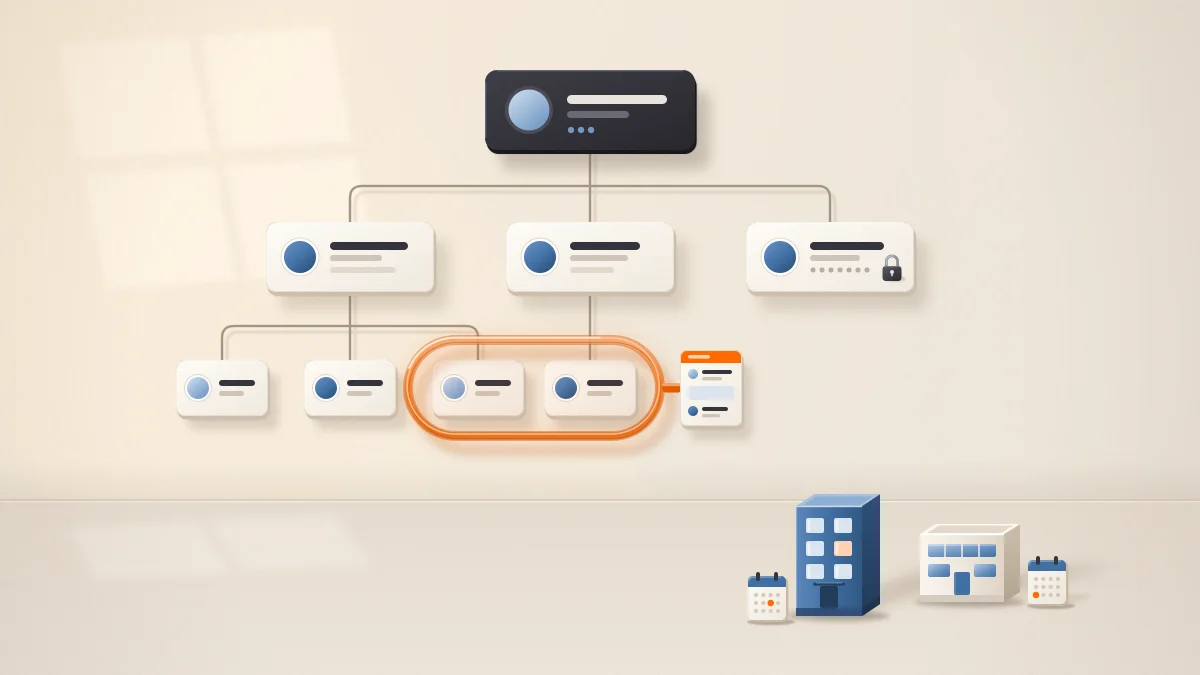
Who sees what is set by roles, and we create as many roles as we need. A role gets rights per block of the employee profile: it can see skills and contacts but not salary or home address, and a person whose role lacks the cross-office right sees only colleagues from their own office and those with no office set. Sign-in can be protected with two-factor authentication through an authenticator app, with backup codes for the day the phone is lost.
Hiring: From Vacancy to Hired Candidate
A vacancy in MayBee has hiring steps, a salary range, an office and the job boards where it is posted, and candidates move along a kanban board from step to step.
Applications arrive without a recruiter copying them: we publish vacancies on our career page and on job boards, and the job board integrations bring the applications into the system, some at once and the rest within 30 minutes.
The system flags duplicates by email and phone among the candidates a recruiter can see, and posts to our HR channel in Discord when a new candidate matches one they cannot see. It parses a PDF or DOC CV into the card, and when a recruiter accepts an application from an integrated job board as a new candidate, it can fill the card from the CV. A browser extension creates a candidate from a LinkedIn profile.
Communication stays attached to the candidate: recruiters write from the card through a connected Gmail or Outlook account, with templates, and the messages stay on the card. They assign tests and forms from the same card. A recruiter assigned to a vacancy sees it, its candidates and its applications even when their role grants no recruiting rights; the access level on the assignment decides what they can change. A rejection can carry a reason from a shared list, and that list feeds the analytics.
Hiring analytics show recruiter workload and performance, which job boards bring real candidates, where in the funnel candidates drop and why, time to hire and time to fill, and how many offers candidates accept.
From Candidate to Colleague: Onboarding as a Process
From Card to Employee
A hired candidate becomes an employee from their card in one action: the fields we collected carry over, and the candidate profile stays, linked to the new employee profile, so the recruiting history survives the moment when HR starts needing it.
The new employee receives an email invitation that is valid for two weeks, and HR assigns them an onboarding process. A process is a sequence of steps of four kinds: a text to read, a form to fill, a test to pass or a checklist to tick. For each step we choose who confirms it, the employee or a responsible colleague, and we can lock the order; a step carries its own comments and files. HR sees every running process on one page, with each person's progress.
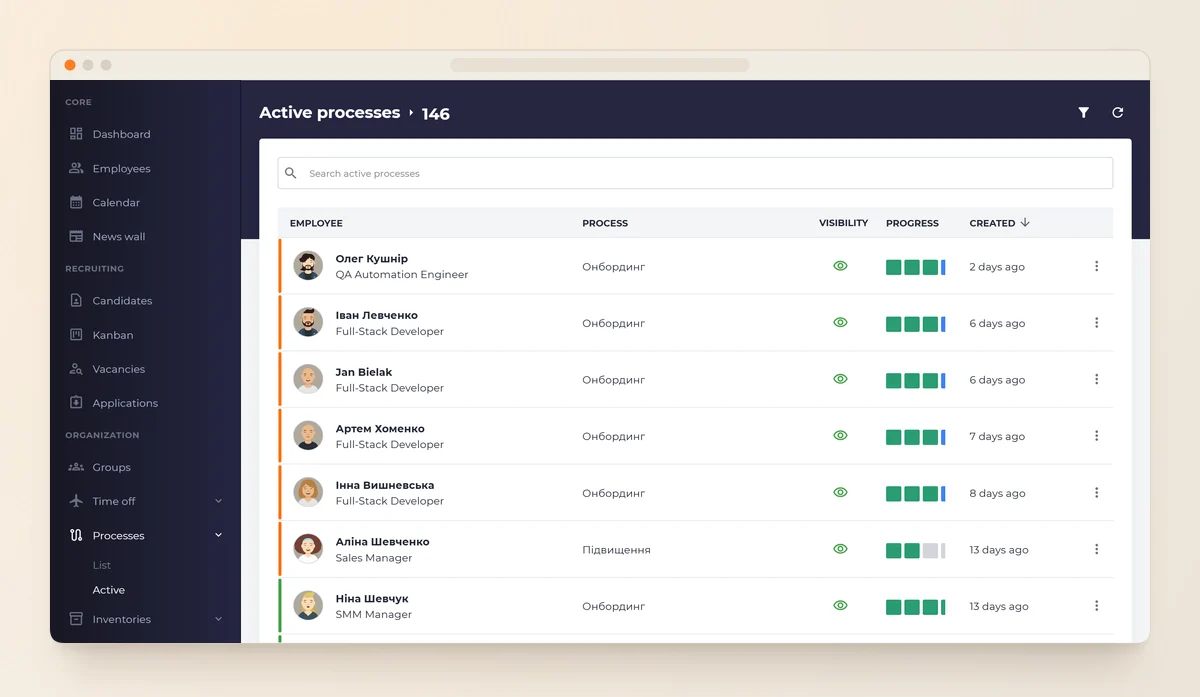
Screenshots come from the public demo; names and numbers in them are sample data.
Our Onboarding Steps
- A welcome form asks for everything the contract and the equipment order need.
- Regulations and instructions come from the knowledge base. We set access to each article by employee, department, position or group, so a new engineer sees the engineering handbook.
- A checklist step covers equipment. A laptop issued through the inventory module stays on the employee's profile, with its history, until it comes back.
- A test step confirms the person has read the company rules.
Probation
The dashboard's Today summary, described with the analytics below, lists whose probation period is ending, next to the active onboardings. Our time-off policy forbids requests until that date, and the next section explains where that rule lives.
Time Off: Policies, Rules and Approvers
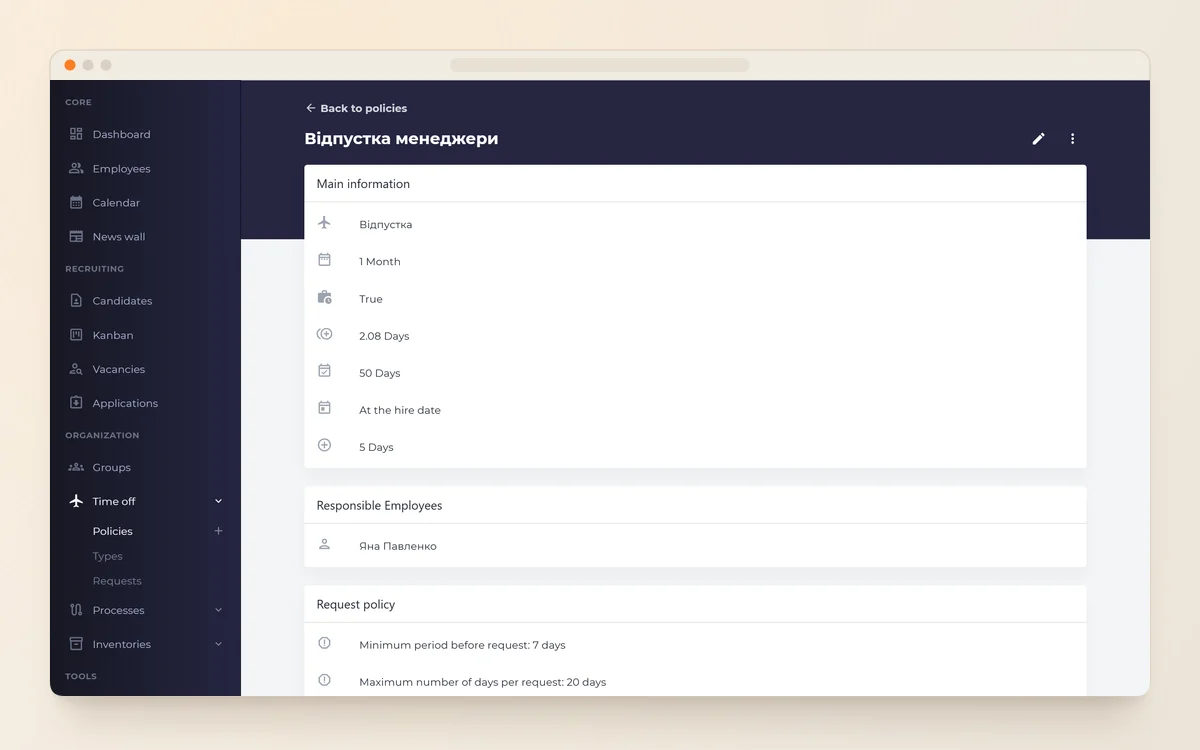
Time off runs on policies. A policy is the set of rules attached to a time-off type; an employee has one policy per type, and a company can keep several policies of one type, for example one for developers and one for managers, with HR assigning the right one to each employee.
Accrual
Accrual is automatic: a policy defines
- the accrual period, and when the first accrual happens: from the hire date, after a delay, at the moment HR assigns the policy, or on the first date of the period;
- the maximum balance;
- what happens to the remainder at the end of the period: a reset, or a carry-over as a number of days or as a percentage.
HR can adjust a balance by hand, and every accrual and adjustment stays in the profile's history.
Request Rules
Request rules are optional. A policy can forbid requests during probation or require notice before the start date; it can also set a minimum and a maximum length, allow a partial day (a quarter, a half, three quarters) or hours, and make the note field mandatory. The system deducts the days the moment the employee submits a request and returns them to the balance if an approver rejects it or the employee withdraws it. The employee cannot edit a submitted request; they withdraw it and file a new one.
Approval
Each policy names its approvers: the employee's direct manager, the department's manager, the group manager, a specific person or a combination. Everyone named has to approve, and one rejection rejects the request.
Because developers and managers are on separate policies in our setup, their requests go to different people: a developer's request goes to their project manager, HR and the CTO; a manager's request goes to the COO and HR. Once the decision is final, the system notifies the author and all approvers.
Calendar and Notifications
Approved time off becomes an event in the time-off calendar, the dashboard shows who is out today, and a table lists time off for any period; at month end HR filters that table by month. Public holidays come from the office calendar. Notifications go out in the app, by email and, if the person has connected one, to a personal Slack or Telegram bot; our HR channel in Discord receives a message about time-off requests through a webhook.
Setting up time-off policies, onboarding processes and HR analytics for your engineering team?
Internal Communication and Surveys
Our people are rarely in one room, which is common for developers: Stack Overflow's 2025 Developer Survey puts about a third of them fully remote and more than a third hybrid. Inside MayBee, on the web and in the mobile app, the news wall, the calendar and surveys carry the communication between the company and its people; project chat lives in each team's messenger.
The news wall carries company announcements with reactions, comments and polls, and a group can have a wall of its own. In comments on candidates, employees and vacancies you can mention a colleague, and the system notifies the mentioned person. The calendar holds company events and meetings, one-on-ones included; a meeting created with a connected Google or Microsoft 365 work account can carry a Google Meet or Teams link.
Surveys run in sessions, anonymous when we choose, with employee Net Promoter Score (eNPS) and a comparison between sessions, so a drop in one department between two sessions shows up as a number. We address a survey to a department, a position, a group or an office and read the results by department, position and office; MayBee marks any eNPS based on fewer than ten responses as unreliable and hides cohorts smaller than five. A major release on 26 October 2026 added survey sessions with comparison between runs, HR analytics tiles on the dashboard, polls on the news wall and mentions in comments.
Forms with scales, employee tests with automatic checking of closed questions, and 360 reviews with a skills radar cover the feedback that surveys do not. For the day-to-day side of managing people you do not see every day, see managing remote development teams.
Employee Profile and HR Analytics
Each process above writes into the same employee profile. The profile holds the career history with every change of position, department, level, office, employment type, schedule and salary, each with a date and a comment, plus files, skills with levels, tags and custom fields for whatever we did not foresee.
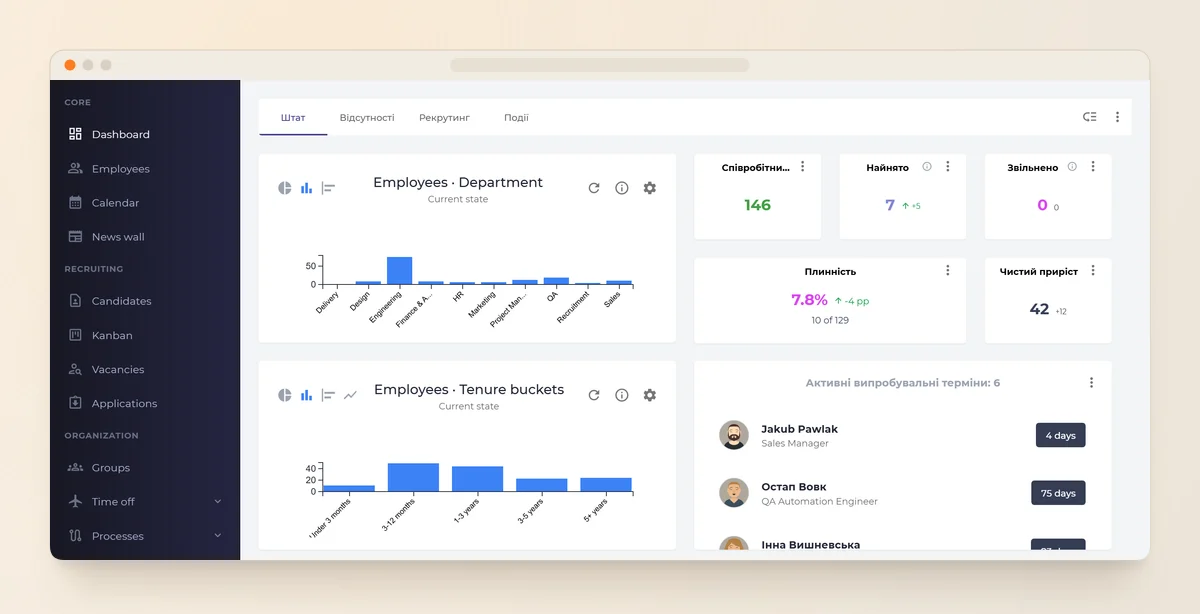
The HR analytics tiles on the dashboard read from those profiles:
- headcount on any date, hires and departures;
- turnover by department, position, office and manager, and managers' teams with their size and turnover; Gallup puts managers behind at least 70% of the variance in employee engagement scores across business units, which is why the manager axis matters to us;
- new-hire turnover: the share of new hires who left within 3, 6 and 12 months;
- salary total (the sum of salaries on profiles) and median salary, with the median hidden when fewer than five records stand behind it;
- time off and eNPS;
- the Today summary: who is out, whose probation is ending, pending time-off requests and active onboardings.
We assemble dashboards from tiles, lists and a chart builder, and every number respects the viewer's rights: a tile needs the matching right, and without the cross-office right the HR numbers narrow to the viewer's own office.
Leaving Well, and Where MayBee Stops
Departure and Handover
HR enters the last working day in advance, and the next day the system changes the status, closes all login sessions and freezes the time-off balance as of the last working day. If equipment is still assigned to the person, the system warns without blocking, and the laptop goes back through the inventory. The profile and its career history stay.
Handover is a process like onboarding, with steps and responsible people; the responsible person revokes access to external tools, such as code repositories, in those tools, outside MayBee.

Outside MayBee
MayBee does not do the following:
- It does not calculate or pay salaries.
- It does not keep timesheets or count worked hours; work schedules exist so that the system counts time off against the right days.
- It is not a team messenger. Mail to employees and candidates goes through connected Gmail or Outlook accounts, and project chat lives in the team's messenger.
- It has no shift schedules, and it has no internal approval step before HR opens a vacancy.
- The MayBee team does bulk import from spreadsheets with its template; there is no self-service import.
What One System Changes
Vacancies, candidates, onboarding, time off, surveys and departures are ordinary HR processes. What one system changes is that a person's record no longer splits in two at the moment of hire: every process writes into the same profile, the approvers come from the policy, the holidays from the office calendar, and the analytics tiles read from the profiles those processes fill.
The list of what MayBee does not do belongs to the same picture: payroll, timesheets and team chat stay in the tools built for them, and the system does not pretend otherwise.
Running HR for an engineering team across several tools and want to compare notes on moving it into one system?
Frequently Asked Questions
1.What happens to an employee's time-off balance when they move to another team?
2.Can a policy require notice before time off?
3.What changes in HR when employees follow different public-holiday calendars?
4.Can employees see their own balance and accrual history?
5.When should a company of our size build its own HRMS?


Share


